


“Double-check your output,” people instruct AI. But what should it check?
When you’re new to a subject, you may not know which assumptions matter or which mistakes a polished answer can hide. How do you learn to ask for checks you don’t yet know you need? As artificial intelligence gets better at doing our work for us, finishing a task can hide what people haven’t understood.
To work out what you need to learn, it helps to look at what more knowledgeable users do differently.
Earlier this year, Anthropic analysed roughly 400,000 interactive sessions on its Claude Code platform. The researchers looked at how humans collaborate with AI on complex tasks and which patterns accompany success.
“In a typical session, people make most of the planning decisions (what to do) and Claude makes most of the execution decisions (how to do it). The greater domain expertise a person brings to a session, the more work Claude does per instruction.” — Hitzig et al., 2026
When looking at the data it’s important to keep in mind that this is vendor-run research on the vendor’s own product. Anthropic has a commercial interest in showing its tools empower skilled workers. The researchers also didn’t independently test people’s knowledge. A model inferred their expertise from how they framed prompts and corrected errors. Some of what it labelled “domain expertise” may reflect prompting skill.
So consider this article a field report on how practitioners work with these models and what we might learn from those patterns.
With those caveats in mind, the findings raise an important question for learners: how much do you need to know to use AI well?
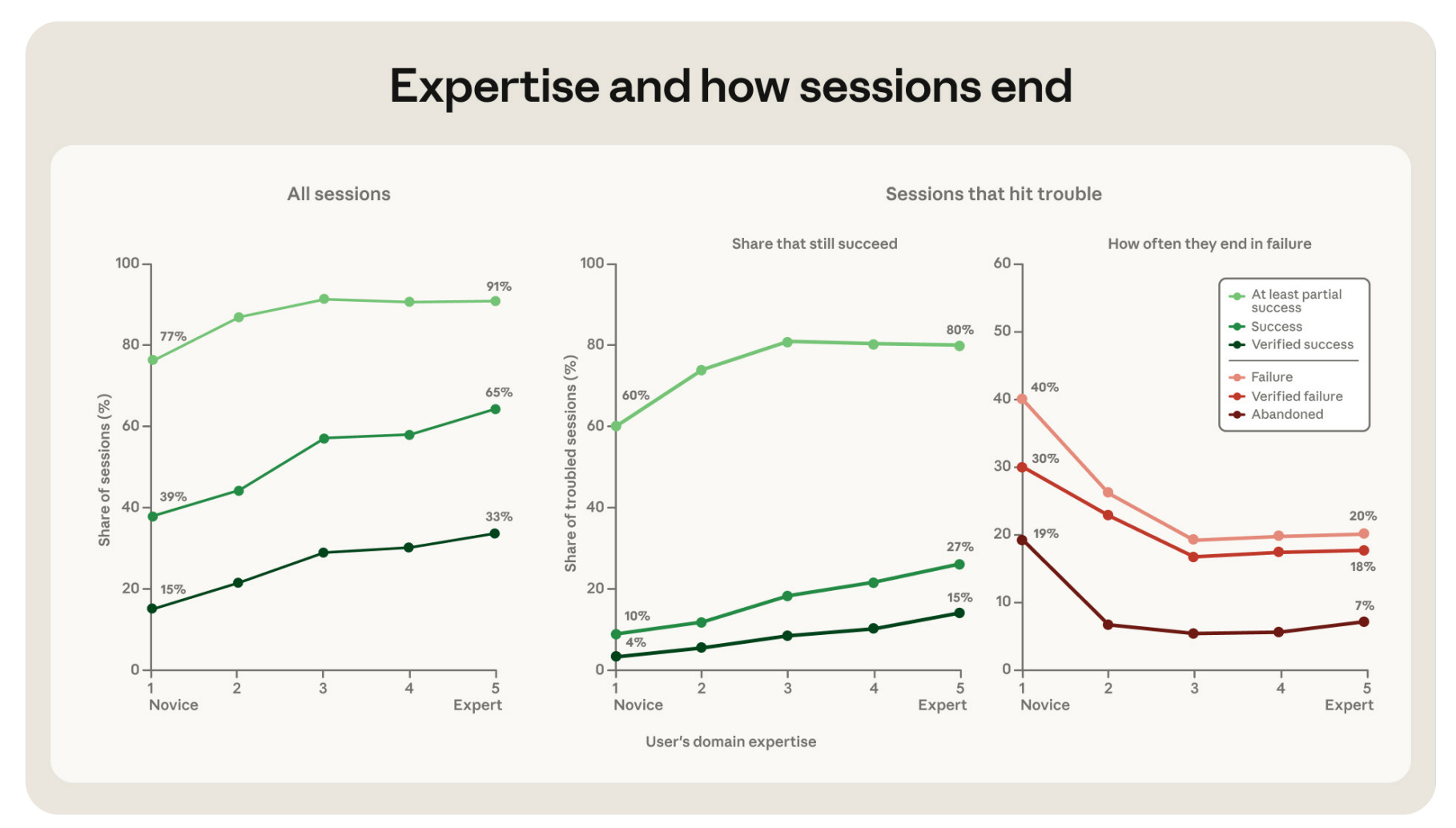
Counterintuitively, you don’t need a decade of mastery to unlock these gains. In Anthropic’s data, you can see the steepest jump in success rates when you compare the Novice and Intermediate levels. Past that point, the curve flattens. In the report’s words, “the gains come mostly from competence, not mastery.”
That points to the value of knowing enough to scope a task, check an output, and respond when AI goes off course. Novices can struggle with all three. When sessions hit trouble, those rated novice were more likely to end in abandonment.
This raises a difficult question for lifelong learners and the future of our workforce.
If a working grasp of a subject helps you direct AI, but you use AI to bypass all the beginner-level work, how do you reach the intermediate stage?
Here’s what expertise means in this context and how you can use these tools to build your judgment.
Competent Users Direct AI by Imposing Constraints and Anticipating Errors While Novices Rely on Broad Requests
So what separates a novice from an expert when directing a large language model?
The key difference is in how people frame and scope the task, what they ask AI to verify, and how they respond to errors.
A novice-rated conversation tends to be more like a broad request, leaving important choices unspecified. Verifying requests are also still general, like a broad prompt of checking whether the answer is correct. And lastly a novice user will have difficulty identifying the underlying error or explaining what needs changing, in case an output drifts off the intended course.
An expert, on the other hand, gives an initial prompt that already reflects the task’s constraints, relevant distinctions, and tradeoffs. Experts also include specific checks aimed at places where this particular task could go wrong. And lastly, experts recognize a substantive mistake and can offer correction that helps the AI proceed, and ultimately, deliver the intended result.
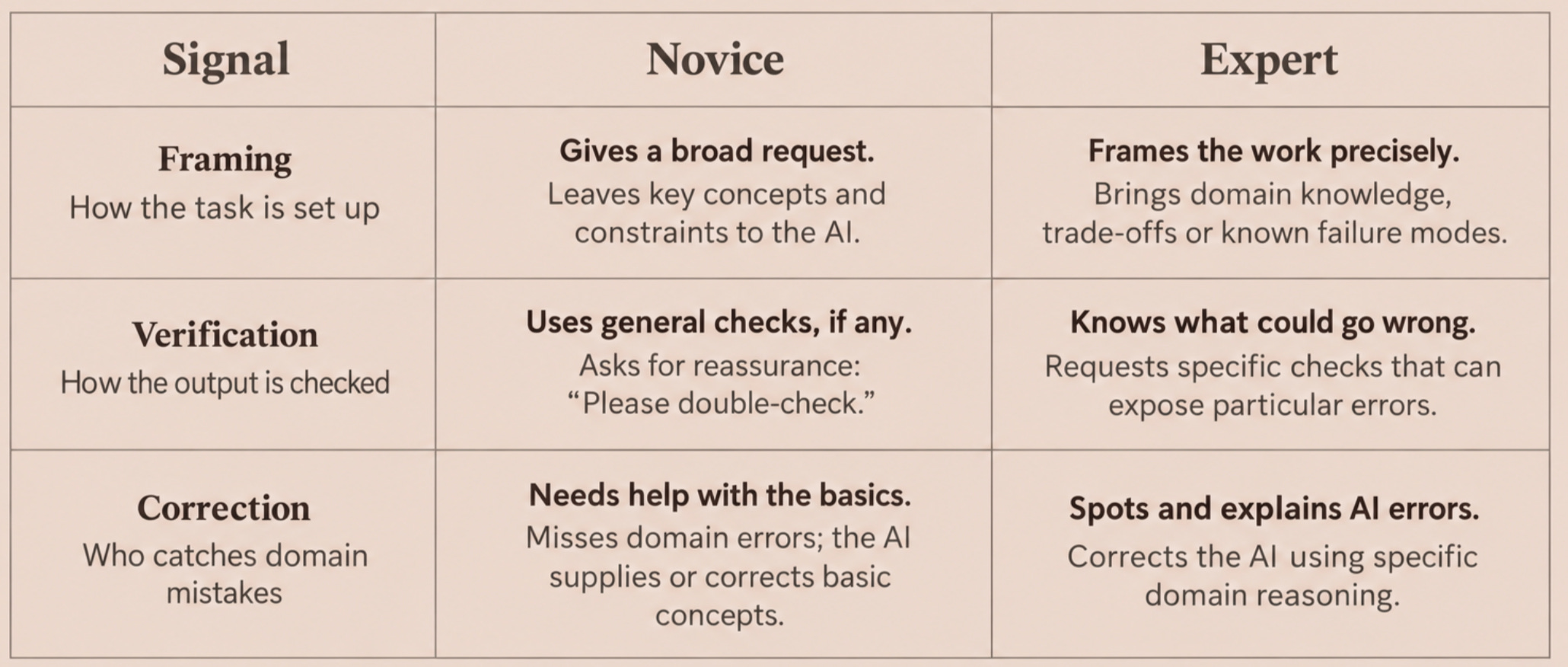
Here’s a screenshot form Anthropics report on how this can look like in practice:

Build Your Judgment by Deliberately Practicing Scoping, Verification, and Debugging
The implication is that developing subject knowledge still makes sense. You don’t need ten years in a field to start directing AI well, but building a working grasp of the task matters.
For a skill you want to develop, give yourself opportunities to make a prediction, attempt a solution, examine a mistake, and find out whether your reasoning holds up.
To get better at scoping, study how someone knowledgeable defines the work. Research on worked examples offers a useful starting point: study a problem with its solution steps explained, then attempt something similar yourself. Say you’re a general manager who wants to build a small app to track your reading. Find two or three beginner-friendly walkthroughs by experienced developers. Pay attention to their decisions: what should the user be able to do? What information needs saving? What belongs in the first version? Choose one decision, explain why it matters, and compare your reasoning with the walkthrough. Then close the examples and write your own brief: “I want to add books, mark them as finished, and keep that information when I reopen the app.” Compare your brief with what you studied. Which important details did you leave out?
To get better at verification, learn what each check should reveal. Developer Simon Willison emphasises testing against clear expectations, and Anthropic’s guidance recommends giving the model concrete ways to verify its work. Start by studying the checks in a reliable tutorial and asking why they matter. In your reading app, seeing a book on screen confirms the app can display it. To check whether the app saved it, refresh the page: the book and its reading status should still be there. Write down your expectation before testing, then inspect what happens. Keep a short checklist with a reason beside each item. When you add a feature, try designing its checks before consulting the examples. This helps you practice deciding what kind of signals would indicate you can trust the result.
To get better at catching mistakes, practise with examples that explain what went wrong. Once you understand a correct example, study a few common failures in that domain. Research on learning from incorrect examples shows the value of feedback that explains the underlying mistake. A debugging walkthrough might show an app where entries disappear because it displayed them but never saved them. Study how the developer identifies the cause and confirms the repair. Then try a similar exercise, checking your diagnosis against the explained solution. When your own project breaks, don’t abandon it but keep digging for the root cause. Practising across different examples can help you use what you’ve learned in new situations.
Sources
Hitzig, Z., Massenkoff, M., Lyubich, E., Heller, R., & McCrory, P. (2026). Agentic coding and persistent returns to expertise. Anthropic.
TLDR. LOL! JK. The Anthropic report seemed heavy into coding applications, more than other types oif queries. And who abandons a query when the going gets tough? The people who weren’t sincere about the answer perhaps, or those who are generally clueless users of Ai. Overall, I don’t think that report was that useful. IMO. The fact is, in my experience, the more expertise in a particular subject you have, the better your Ai results, and the more often you end up correcting Ai. More and more lately, while I find Ai *extremely* useful, I find I have to correct it when it goes in the wrong direction. it does save me hours and hours of work, for sure. One thing it’s really good at is fixing technical issues. I’ve used it to fix my website when I transferred my DNS service. Also, some models, Fable in particular, is really really good at writing first drafts. Anyhow, round and round we go… where we stop… only Ai knows. ;)
Intermediate competence as the steepest AI collaboration gain lands for me. When I am new to a subject, a polished answer can hide mistakes I cannot yet name. Where do you still insist on a first version the model never gets to touch, especially before you know what to double-check?
https://jaiisyourman.substack.com/p/a-bridge-is-only-half-mine