
A Practical Guide to Claude Code for Lifelong Learners
What it is, why it’s different from ChatGPT, and how to set it up this week.


In the last months, I heard every one of my code-writing friends rave about Claude Code. I trust their judgment, so I wanted to see that potential myself.
I downloaded Claude Code, full of excitement.
But that excitement lasted about nine seconds.
I read the words “terminal” and “bash,” didn’t know what either meant, and closed the endeavour.
But I’d spent the past years writing about how we learn and how AI changes that, and so the gap between what my tech friends were describing and what I could access nagged at me.
While I was still coaching my ChatGPT and Claude AI to give me better answers, they were creating websites, apps, and functional alternatives to Facebook. They were using Claude code to build things, not just say things.
So I went back. I Googled “what is a terminal.” I asked Claude’s chatbot to support me in setting it up and demystify the tech language I didn’t fully speak (yet). And within an hour, it was working.
I now use Claude Code daily, and it has started to change how I learn and work. I still don’t know how to code, but I learned to direct it in ways that feel helpful to me.
This guide is for the version of me from a month ago: someone who uses ChatGPT or Claude confidently, has heard the buzz around Claude Code, and wants to understand what it is, why it’s different from the chatbots you already know, and how to set it up — even if you’ve never opened a terminal in your life.
Whether you decide to use Claude Code or not, after reading this post, you’ll understand what’s become possible and why it matters for how we work and learn.
I’m an independent writer and researcher — not sponsored by Anthropic. This publication is and will remain ad-free. It is funded entirely by paid subscribers.
The Difference Between Chatbots like ChatGPT, Gemini, and the Claude Web App and Claude Code
Claude.ai, ChatGPT, and Gemini are chatbots; they respond to you inside a conversation window. You type, they answer, you type again. The output is text.
Claude Code is an agent, which means it takes actions on your behalf.
That sounds like a small difference. It isn’t.
Why This Matters For You
When you give a chatbot a task, you get a one-time output: a draft, a summary, a suggestion. You might collaborate with your chatbot to come up with better iterations of this output. And at one point, you take the final answer, and continue to work with it.
When you give Claude Code a task, it reads your files, writes code, runs that code, checks the result, adjusts if something broke, and continues — without you intervening at every step. It operates in a loop: act, observe, adjust, repeat.
And it does all of this inside your actual project — your folders, your documents, your data — not in a chat window, but on your computer.
Ethan Mollick, Wharton professor and Substack author, has the clearest framework for understanding why this matters. He distinguishes between the model (the AI brain), the app (the interface), and the harness (the system that channels what the AI can do). A harness is what turns the raw power of a horse into the ability to pull a cart or plow a field.
Claude’s chatbot and Claude Code run on the exact same AI brain (the underlying model). But the harness is different. In the chatbot, that brain can only talk to you inside a window (while still being connected to your google drive, gmail, etc). But in Claude Code, that same brain can read your files, run commands, build tools, and iterate on its own work.
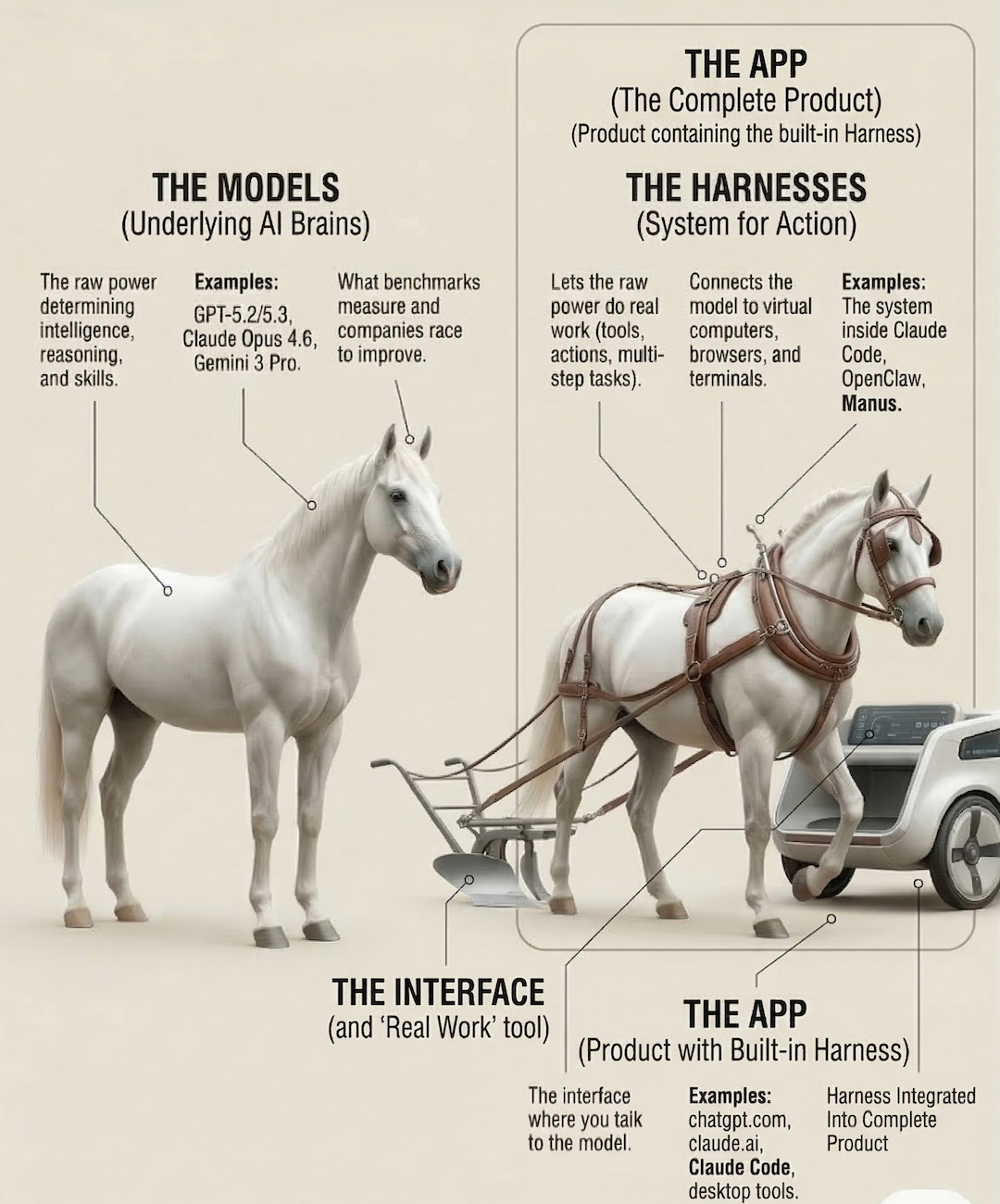
So while the model itself didn’t get smarter, it got a better harness that allows you to move from an “AI assistant I talk to” to an “AI system that works for me.”
Here’s what that shift looks like in practice:
Context. A chatbot's understanding is shaped by the current conversation — the more you exchange in one session, the more it has to work with. Claude Code's understanding comes from your files. It reads your entire folder structure directly, so its context scales with the complexity of your project, not with how much you've typed in one chat.
Persistence. Chatbot memory carries some information across conversations, but it's summarized and lossy. Claude Code stores knowledge in files it creates and maintains — like
CLAUDE.md, a configuration file where it keeps project conventions, decisions, and workflows. Because these are real files on your computer, they persist at fidelity across sessions. This is what makes workflows reusable: you build a process once, and it stays consistent and reliable over time.Capabilities. Claude Code can browse the web, connect to services like Google Drive or Slack, search databases, and run multiple tasks simultaneously in separate terminal windows (the text-based interface where you interact with it). Anything you can do from your computer's command line, it can do too — expressed as code it writes and runs itself. The main limitation: it works through text commands, so it can't click buttons in visual apps like Figma, and it needs you to set up connections for anything requiring passwords.
If you’re a power user of ChatGPT’s “Projects” or Google’s “Gems,” you might wonder what’s different. The key distinction: those features can’t update their own knowledge or system instructions. You have to manually manage them through the interface. Claude Code’s configuration is just files — which means the agent can read, modify, and improve its own setup.
Real Examples from Non-Coders
Here some examples of how people (also non-coders) use Claude Code to build things:
Building a searchable archive of your own thinking. As a writer, researcher, or consultant, you can point Claude Code at a folder of everything you’ve ever written, then query it in plain language. “Which pieces have I explored neuroplasticity in?” “What tensions appear across my writing on knowledge work?” It functions like a personal knowledge base you can build in under an hour (assuming your writing is already in text files) and query conversationally.
Automating the tedious. Claude Code’s creator, Boris Cherny, demonstrated a folder of 250 expense receipts organized into subfolders by category, with key details extracted into a spreadsheet — accomplished in minutes with a couple of plain-language instructions.
Even if you stop here, you now understand what an AI agent is and why it’s different from chatbots. If you want to go from understanding it to using it, the rest of this post is the guide I wish I’d had a month ago: more real-world examples, the full step-by-step setup, and the two file architecture that makes Claude Code work for your specific projects.
